
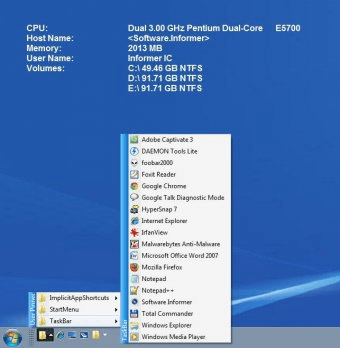
Free Launch Bar offers pretty much the same functions and features as the Windows’ standard Quick Launch Bar, but with a very important addition: the possibility of grouping the menus and menu items into categories. By being able to organize these shortcuts into groups you will also be able to access them much faster and easier. You won’t have to browse through countless menus and submenus to find and launch the needed applications anymore.
Another aspect of Free Launch Bar that makes it a better replacement to the Quick Launch Bar is, in my opinion, its large number of customization options. It lets you configure a large variety of details concerning the look of the shortcuts and menus. You can, for example, change the colors and the sizes of launchbar’s icons, toolbars, menus and other elements. Furthermore, it allows you to easily add or remove items from the menus. The use of drag-and-drop actions and of keyboard shortcuts (hotkeys) is also supported.
In conclusion, Free Launch Bar is a nice addition to your collection of installed applications, as it will surely make accessing the shortcuts of your frequently used applications much faster and easier. It is also free.






Comments (2)
Indeed, this free version is so fully featured that I didn't really need to pay for the 'full' version (called True Launch Bar) - but again it was so good that I actually upgraded just in order to pay for such a tremendous piece of work.
One great advantage of this utility over other similarly featured program launchers of which I'm aware is its minimal use of system resources, because it uses the native Quick Launch bar system, simply adding the most amazing range of functionality and configurability.
Fully recommended!